

Retro Rewind – Video Store Simulator Steam Pre-Installed
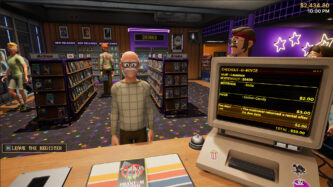
Retro Rewind: Video Store Simulator is a nostalgic simulation game where players run their own 1990s-style video rental shop, inspired by the golden era of VHS tapes and stores like Blockbuster. Released around March 2026, the game focuses on building and managing a small business from scratch—handling customers, organizing inventory, and expanding your store into a popular rental destination. In the game, you take on the role of a shop owner responsible for everything: renting out movies, selling snacks, recommending films to customers, and managing daily operations. You’ll need to organize shelves, track late returns, rewind tapes, and even deal with broken or damaged rentals. The gameplay captures the authentic feel of running a real video store, where busy nights, especially weekends or rainy days, bring in more customers and challenges.
Retro Rewind – Video Store Simulator PC Game pre-installed in direct link
A big part of Retro Rewind: Video Store Simulator is customization and growth. Players can decorate their shop with posters, change layouts, buy furniture, and expand the store as profits increase. You can also hire staff to help with tasks, manage inventory using an in-game computer system, and collect thousands of VHS tapes—each with unique titles, genres, and artwork inspired by classic 80s and 90s movies. The game also includes dynamic systems like seasons, holidays, and changing customer behavior, making each in-game week feel different. Some players on Reddit mention that features like weather affecting customer traffic, staff behavior, and late fee reactions add realism, though gameplay can become repetitive over time depending on playstyle.
Screenshots



System Requirements
Requires a 64-bit processor and operating system
OS *: Windows 8.1, 10 or 11 64bit
Processor: 2 GHz Dual Core CPU
Graphics: Intel HD Graphics 520
Network: Broadband Internet connection
Storage: 1 GB available space
Support the game developers by purchasing the game on Steam
Click the Download Here button above and you should be redirected to GamesDatabase.
Wait 5 seconds and click on the grey 'download now' button. Now let the download begin and wait for it to finish.
Once the game is done downloading, right click the .zip file and click on "Extract to" (To do this you must have 7-Zip or winrar, which you can get here).
Double click inside the Retro Rewind - Video Store Simulator folder and run the exe application.
Thats all, enjoy the game! Make sure to run the game as administrator and if you get any missing dll errors, look for a file named All In One Runtimes.exe run this and install it.